A Double Shot of DuckDB: Vector Similarity Search and Quack
Published on: 5/27/2026
This post is part of my series on DuckDB:
- A Dab of Duck
- Full-Text Search with DuckDB
- A Double Shot of DuckDB: Vector Similarity Search and Quack
- The Mystery on DuckLake: A Time-Travelling Whodunit Story
Overview
This is the third entry in my series of exploratory posts about DuckDB. Readers should have no trouble following along but you may want to start with A Dab of DuckDB if DuckDB is entirely new to you.
As the title suggests, in this post we will dive into two DuckDB topics: vector similarity search (VSS) and the new Quack Protocol. I was originally going to focus on only vector support but Quack was announced while I was working on this post and I couldn’t resist including it once I got it. I also think there’s a compelling case for how they can be used together in modern applications, as we’ll see in the comprehensive demo at the end of the post.
Vector Similarity Search
As mentioned in my last post about full-text search in DuckDB, I was very keen to learn about the state of vector search in the DuckDB ecosystem. I’m just coming off an ambitious project on which we relied heavily on the pgvector Postgres extension. I also have experience with vector storage/search solutions, like pgvectorscale and Weaviate.
So, I was pleasantly surprised to learn that DuckDB offers vector similarity search via the VSS core extension and that you can start using it in seconds with just a few SQL statements:
INSTALL vss;
LOAD vss;

CREATE TABLE IF NOT EXISTS frames (
    id UUID PRIMARY KEY,
    embedding FLOAT[512] NOT NULL,
);

-- see Cosine Similarity Demo below for query interface / comparison function
If you’re exploring an unfamiliar data set this functionality will undoubtedly yield results you would have otherwise missed if searching using concrete terms (“Alice never responded” vs. “my sister never replied”). In contrast with full-text search, as powerful as it is, this feature set is next level and truly feels magical. Though, this power comes at a cost – especially if you lean on HNSW indexes for performance, which you will probably want to do. Indexes require time/space to compute and can go stale (e.g. post-delete but pre-rebuild). Also, because of the “approximate” nature of HNSW, you may see different results between brute force queries and queries utilizing indexes. See the “Inserts, Updates, Deletes and Re-Compaction” section of the docs.
DuckDB offering powerful features with this level of simplicity should no longer surprise me but … it still does. It’s just so refreshing to be spared from having to mess around with c/make, Docker or signing up for some web service before you can start experimenting.
I also want to make sure I call attention to just how nice DuckDB’s EXCLUDE clause is when working with vector columns. When working with pgvector, I found myself having to remember to only output certain columns for fear of accidentally dumping thousands of lines of vector output into my terminal when naively using SELECT * FROM some_table. With DuckDB, you can instead use SELECT * EXCLUDE (embeddings) FROM frames; without fear of spamming your terminal.
Indexes
VSS offers the following index metrics:
(The linear algebra and applications of index types are outside the scope of this post but I’ll note where these indexes are generally useful inline.)
- [DEFAULT] Euclidean distance (geospatial, measurements, color space, etc.)
- Cosine similarity (semantic/similarity search)
- Negative inner product (recommendations and more efficient than cosine for L2-normalized vectors)
Each metric type has a corresponding comparison function: array_distance, array_cosine_distance and array_negative_inner_product.
There are also various options which can be configured when creating indexes with the usual time/space considerations. See the docs.
It’s worth calling attention to this note in the docs about index creation:
Note that while each HNSW index only applies to a single column you can create multiple HNSW indexes on the same table each individually indexing a different column. Additionally, you can also create multiple HNSW indexes to the same column, each supporting a different distance metric.
So, it’s worth internalizing that indexes are never created automatically. Also, you can use the various comparison functions for brute force searches (more accurate and reliable but wholly unoptimized), which are good for experimentation and the avoidance of premature optimization (i.e. index creation and tuning).
Cosine Similarity Demo
This demo requires a non-trivial amount of supporting infrastructure, as we need to use PyTorch, Transformers and a model (e.g. openai/clip-vit-base-patch32) to create the embeddings for the data set and the query string. I will include the complete script in the demo repository linked at the end of the post.
Assuming we have the following table:
INSTALL vss;
LOAD vss;

CREATE TABLE IF NOT EXISTS documents (
    id INTEGER PRIMARY KEY,
    content TEXT NOT NULL,
    embedding FLOAT[512] NOT NULL,
);
And we populate it by creating rows containing embeddings for a list of sentences like:
CORPUS = [
    "a duck swimming on a pond",
    "a dog walking in the woods",
    "blue cars driving down a highway",
    "people eating in a cafe",
    "the man in the moon smiling",
]
When we create an embedding for a query string (e.g. “a bird moving through water”) and use it to run the array_cosine_distance function:
        f"""
SELECT content,
       array_cosine_distance(embedding, $q::FLOAT[512]) AS distance
FROM documents
ORDER BY distance
LIMIT 3
        """,
        {"q": [...]},
Then we get results like:
Query: 'a bird moving through water'

  0.1611  a duck swimming on a pond
  0.3195  a dog walking in the woods
  0.3354  the man in the moon smiling
Notice that while our query doesn’t mention “ducks” or “ponds”, it is still interpreted as having a semantically similar meaning. 🤯
As noted above, interpreting these scores and their scale is outside of the scope of this post, but the closer the score is to 0.0, the better the match is. If you were to search using an exact match, like “a duck swimming on a pond”, the resulting score would be 0.0000. (Whatever the exact opposite is, its score would be 2.0000) You can also use the previously mentioned index options to broaden, narrow, etc. your results.
Caveats
Persistence
Currently, HNSW indexes are only fully supported for use with in-memory databases. You can elect to use them in file-backed databases by way of the hnsw_enable_experimental_persistence flag but there is no guarantee they will survive a crash or unexpected termination in a reliable state. The linked section of the docs is worth reading and re-reading before you decide to use VSS in production.
Hopefully the underlying issues with the DuckDB WAL will eventually be worked out and custom indexes (all flavors) will become fully supported in file-backed databases.
Resource Utilization
This post is also worth reading in its entirety but I think this section is particularly important to call attention to:
At runtime however, much like the ART the HNSW index must be able to fit into RAM in its entirety, and the memory allocated by the HNSW at runtime is allocated “outside” of the DuckDB memory management system, meaning that it won’t respect DuckDB’s memory_limit configuration parameter.
This might surprise people if their systems suddenly start locking up while ingesting a batch of embeddings.
Quack
The Quack protocol was announced by Hannes Mühleisen earlier this month at AI Council (May 12, 2026) and has made quite a … splash. I highly recommend watching the presentation, as it lays out the case for Quack, provides some very encouraging benchmarks, demos the functionality and Hannes’ enthusiasm is infectious. Truthfully, it’s a large part of why I felt compelled to include Quack in this post.
At a high level, the protocol allows disparate DuckDB instances to communicate with one another (i.e. client-server architecture). The team smartly chose HTTP/2 as the transport protocol and get to piggyback off of decades of optimizations and tooling instead of reinventing the wheel. HTTP(S) may also sit better with corporate IT than some other protocols.
This feature offers many new ways to use DuckDB and also solves one of the biggest historical pain points: concurrent reads and writes. DuckDB still runs as a single process but Quack allows queries from multiple clients to be introduced into the pre-existing, in-process MVCC context and the runtime handles conflicts, query optimization, etc. Conflicts will still occur and clients will need to handle rejected commits but this is nothing new and should behave similarly enough to Postgres or any other RDBMS.
Quack allows for DuckDB to be used in more traditional client-server database setups, and, interestingly, during the AI Council talk, Hannes made a point of calling attention to the fact that this new functionality begins to bridge the gap between DuckDB’s OLAP past and its (possible) OLTP future. It was also impressive to see how performant DuckDB is when doing bulk inserts compared to Postgres and other DBs. This was a major bottleneck in my work with Postgres and pgvector at Ozu and I’m very curious to know how the performance of batch inserts with vector contents compare. The topic of a future blog post, perhaps … 😉
As “traditional” use-cases are concerned, you can imagine Quack being used to support situations where there are many clients in the field reporting into a central database (e.g. IoT sensors or client devices reporting analytics events) or many analysts using a hosted dashboard to run queries against the same DuckDB instance. These use cases were previously possible with DuckDB but required setting up sidecar infrastructure or using cloud services to facilitate the sequencing of queries.
Quack also makes powerful and interesting messaging patterns, like fan-out, fan-in, etc. more practical and we’ll get into a specific use-case in the comprehensive demo appearing later in this post.
Setting Expectations
It’s worth emphasizing that Quack is still beta software. It was only made available starting with the 1.5.2 release and is accessible via the core_nightly repository. To put a fine point on this, I encountered multiple bugs while working through the examples used in this post:
- Default primary keys created using sequences cause Quack clients to crash
- A malformed query in the Quack docs
- (Possible) issue with
UPDATE/DELETEdiscussed below - (Possible) issue with Quack connections discussed below
- (Possible) issue with DuckDB-Wasm discussed below
None of this is to throw any shade at the DuckDB team, however, and I’m happy to report that after opening tickets for two verified issues mentioned above, the DuckDB team acted on them within hours.
UPDATE: I’m happy to report that there’s a pending fix for the primary key bug which was uncovered by this very blog post! 🎉
Demo:
What follows is a very simple example of how Quack works in practice. I’m running my server in-memory but you probably want to use a persistent, file-backed database if you’re doing anything important!
-- server.sql
INSTALL quack FROM core_nightly;
LOAD quack;

CREATE TABLE IF NOT EXISTS quackers (
    id INTEGER PRIMARY KEY,
    name TEXT NOT NULL,
);
insert into quackers (id, name) values (0, 'hello');
CALL quack_serve('quack:localhost', token = 'super_secret');
-- client.sql
INSTALL quack FROM core_nightly;
LOAD quack;
ATTACH 'quack:localhost' AS remote_db (TOKEN 'super_secret');
select * from remote_db.quackers;Open two tmux panes, terminal windows/tabs or do whatever you Emacs people do and run:
- `duckdb -init server.sql :memory:`
- `duckdb -init client.sql :memory:`
… and you should see the client successfully attach to the server and output the results of its query.
Getting the Flock Together
In thinking about how VSS and Quack could be used together, I came up with the following:
- I have N security cameras in my backyard
- On each camera, I want to:
    - Sample every 90 frames
    - Use computer vision to determine if any animals of interest have appeared
    - Create a DuckDB row for each round of analysis
    - Use VSS to find and route candidate frames to a separate, per-animal database
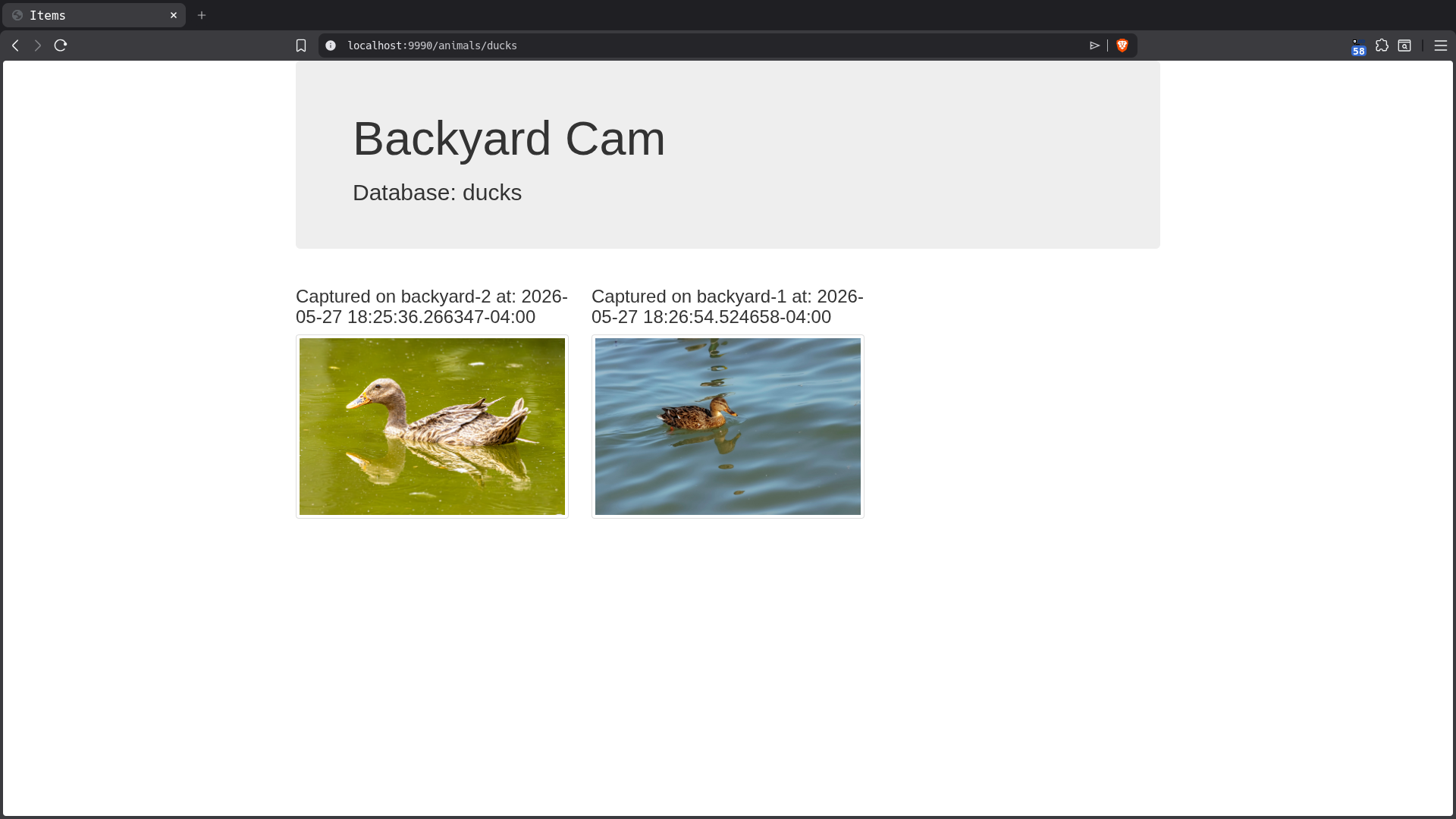
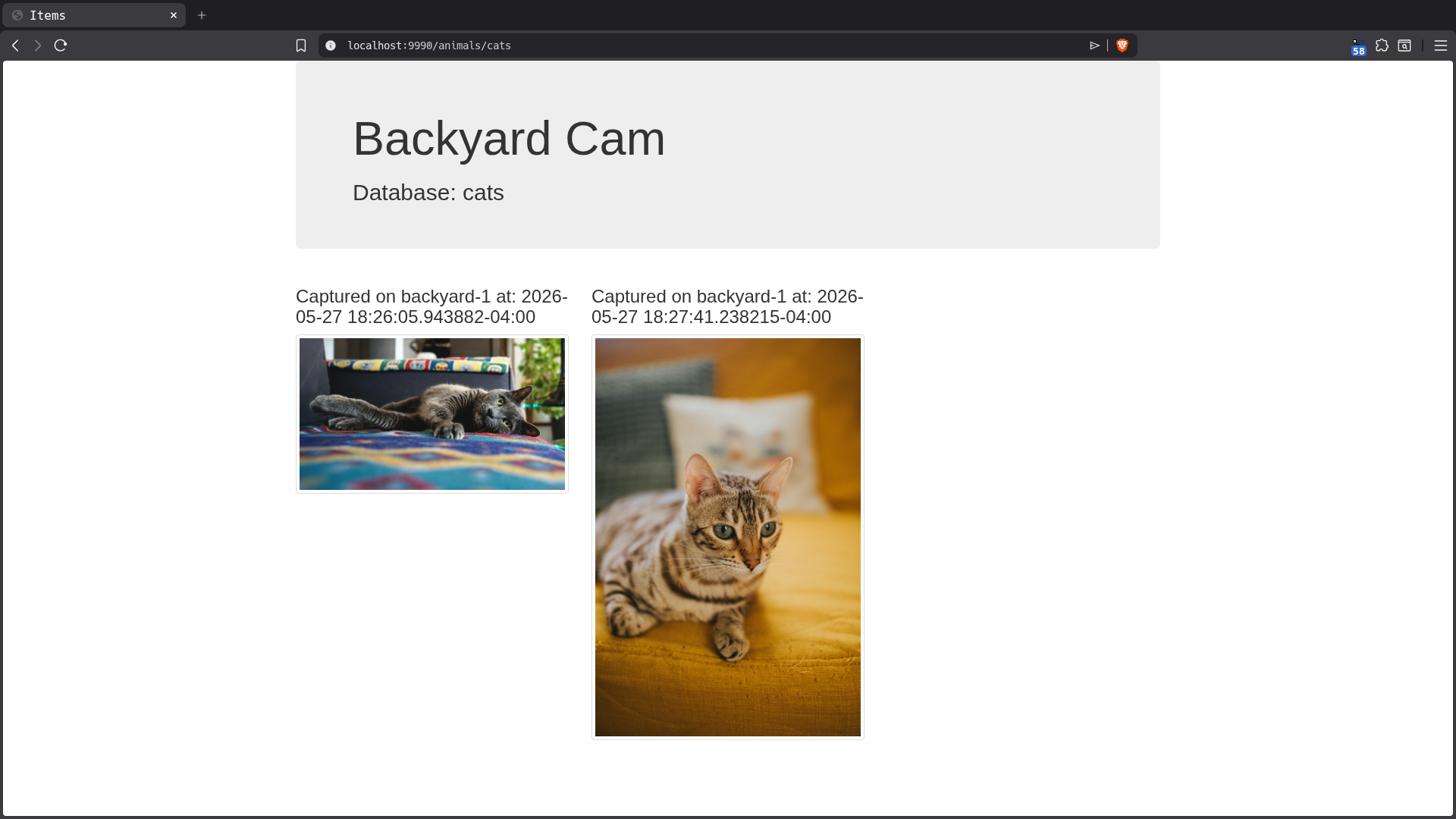
- Create a web front-end which will serve images of animals of interest (e.g. cats and ducks)
This use case is contrived and very silly but if you squint a little and fill in the blanks, you can probably imagine how such a system could be of use in The Real World. Importantly, it’s complicated enough to demonstrate where VSS and Quack shine and where some of the pain points are.
TL;DR
Animal Dashboards
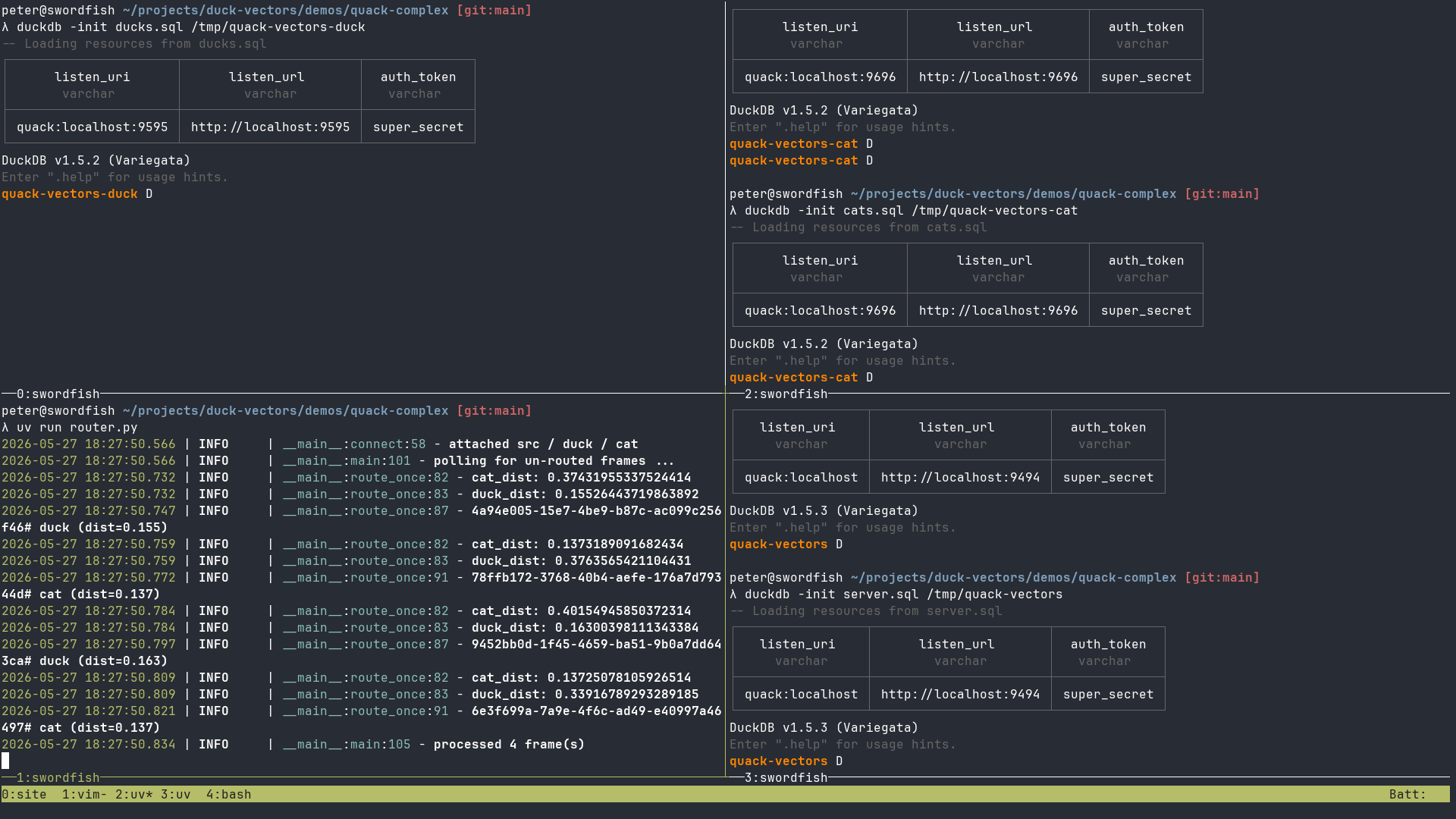
Quack Server Instances and Router
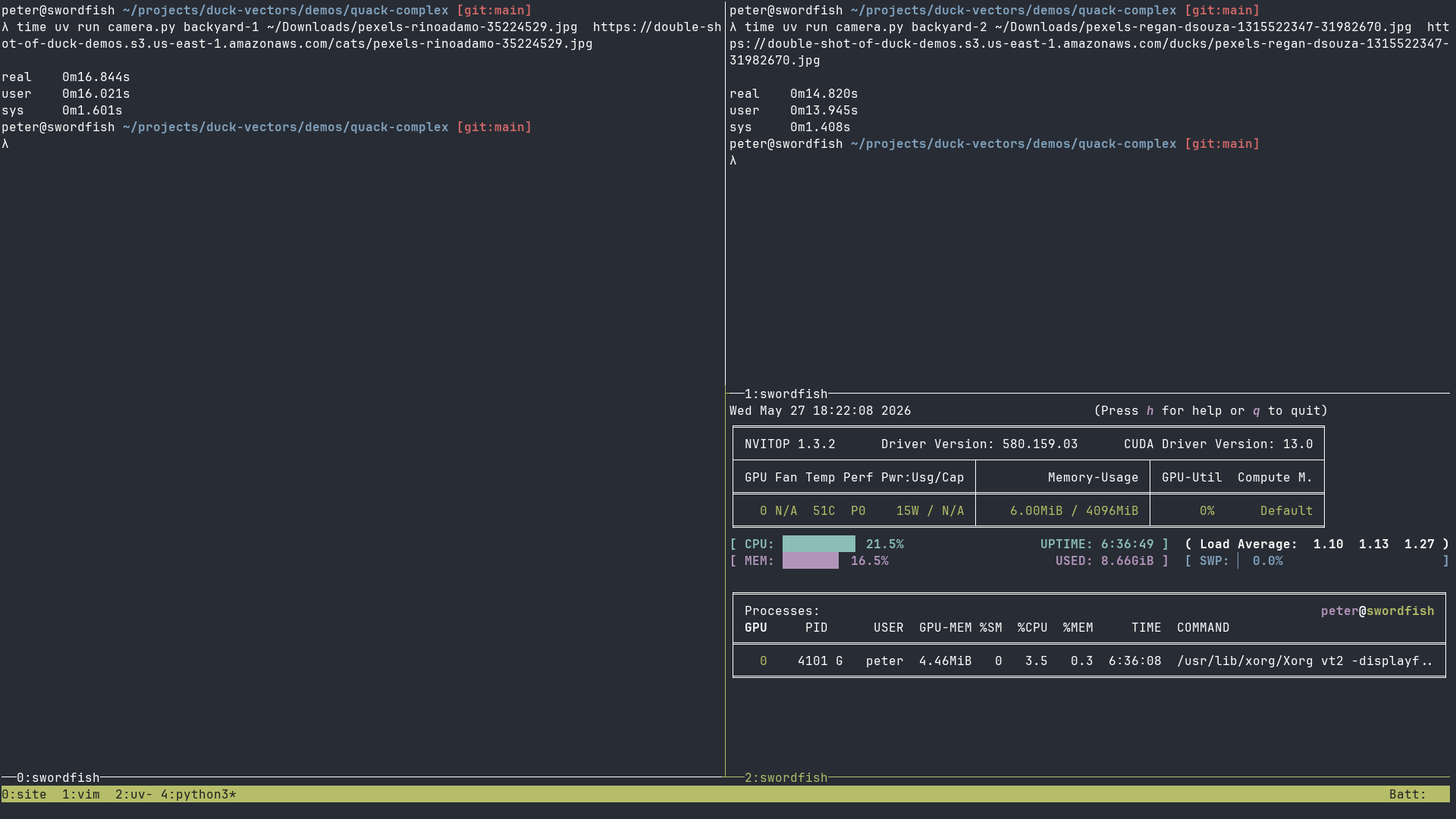
Fake Camera Frame Samplers
Code!
This demo requires multiple Python and SQL scripts and I don’t think it makes sense to dump it all here. I will include some highlights and a link to a repository containing all of the referenced scripts and instructions for running them together.
Gateway Database
This is the clearinghouse or fan-in target for all data being generated by the frame sampling camera client. We create a row for every frame, regardless of whether or not any of the animals of interest were detected, which includes metadata about when the frame was processed and, crucially, the embeddings generated by the camera script’s embedding generator which will be used downstream in queries utilizing the array_cosine_distance function to find frames containing animals of interest.
This DuckDB database acts as a Quack server and many clients (i.e. camera frame samplers) may write to it in parallel.
INSTALL quack FROM core_nightly;
LOAD quack;

INSTALL vss;
LOAD vss;


CREATE TABLE IF NOT EXISTS frames (
    id UUID PRIMARY KEY,
    camera_id VARCHAR NOT NULL,
    captured_at TIMESTAMPTZ NOT NULL,
    embedding FLOAT[512] NOT NULL,
    frame_path VARCHAR NOT NULL,
    frame_uri VARCHAR NOT NULL,
    routed_at TIMESTAMPTZ,
);
Frame Sampling Camera Client
The camera client is a Python script which uses PyTorch to encode each sampled frame as a 512-dimensional embedding. It runs the frame through CLIP’s image encoder, normalizes the resulting vector, and writes it to the gateway database. For the sake of this contrived use case, it’s not doing any classification. This script could classify the contents of the image according to one-or-more text prompts (e.g. “a picture of a duck”) but we’re instead shunting that logic to the router which uses array_cosine_distance to find rows whose stored embeddings meet its search criteria. It would absolutely be more efficient to compute and store the label(s) for image contents once and then do a simple query against those values downstream but where’s the fun in that?
The script doesn’t actually do any sampling of a video stream and I’m faking it with parameterized images. In a real system, we’d probably use FFmpeg to sample every N frames and have a Python script watch for new frames or use PyAV to keep the sampling logic in Python land.
import duckdb
import sys
import torch
import uuid

from datetime import datetime
from PIL import Image
from transformers import CLIPProcessor, CLIPModel

MODEL_ID = "openai/clip-vit-base-patch32"
QUACK_TOKEN = "super_secret"


def insert_data(
    camera_id, frame_id, captured_at, embedding, frame_path, frame_uri
):  # noqa
    conn = duckdb.connect()
    conn.execute("INSTALL quack FROM core_nightly; LOAD quack;")
    conn.execute(
        f"ATTACH 'quack:localhost' AS remote_db (TOKEN '{QUACK_TOKEN}');"  # noqa
    )
    insert = conn.sql(
        f"INSERT INTO remote_db.frames (id, camera_id, captured_at, embedding, frame_path, frame_uri) values ('{frame_id}', '{camera_id}', '{captured_at}', {embedding}, '{frame_path}', '{frame_uri}')"
    )
    return insert


def main(camera_id, frame_path, uri):
    device = "cuda" if torch.cuda.is_available() else "cpu"
    model = CLIPModel.from_pretrained(MODEL_ID).to(device).eval()
    processor = CLIPProcessor.from_pretrained(MODEL_ID, use_fast=True)
    image = Image.open(frame_path).convert("RGB")

    with torch.no_grad():
        img_inputs = processor(images=image, return_tensors="pt").to(device)
        img_feats = model.get_image_features(**img_inputs)
        img_feats = img_feats / img_feats.norm(dim=-1, keepdim=True)

    embedding = img_feats.squeeze(0).cpu().tolist()
    captured_at = str(datetime.now())
    frame_id = str(uuid.uuid4())
    insert_data(camera_id, frame_id, captured_at, embedding, frame_path, uri)
Animal-Specific Database
The animal-specific database instances are Quack servers which the router script will write to. Their schema is simplified and does not contain the source vector data because it introduces extra overhead and won’t be referenced again from this side of the messaging topology. Their primary client is the web front-end which displays the rows in a user-friendly way.
FORCE INSTALL quack FROM core_nightly;
LOAD quack;

INSTALL vss;
LOAD vss;

CREATE TABLE IF NOT EXISTS frames (
    id UUID PRIMARY KEY,
    frame_id UUID NOT NULL,
    camera_id VARCHAR NOT NULL,
    captured_at TIMESTAMPTZ NOT NULL,
    frame_uri VARCHAR NOT NULL,
);
Animal-Specific Router
This script is the bridge which acts as a client of both the clearinghouse and animal-specific databases. It uses pre-computed embeddings of reference images to query the clearinghouse database using VSS to find rows of interest and then routes them to their respective animal-specific database.
The most interesting bit is the select_unrouted function where we query for unrouted rows matching our reference embeddings.
# These are distinct and may need to evolve separately
DUCK_THRESHOLD = 0.25
CAT_THRESHOLD = 0.25

POLL_INTERVAL = 2.0
BATCH = 200  # max frames pulled per tick

# keep embeddings in separate file for readability
with open("animal-embeddings.json") as f:
    reference_embeddings = json.load(f)
DUCK_REF, CAT_REF = reference_embeddings["duck"], reference_embeddings["cat"]

def select_unrouted(conn):
    select_unrouted = """
SELECT
    id, camera_id, captured_at, frame_uri,
    array_cosine_distance(embedding, $duck_ref::FLOAT[512]) AS duck_dist,
    array_cosine_distance(embedding, $cat_ref::FLOAT[512])  AS cat_dist
FROM src.frames
WHERE routed_at IS NULL
LIMIT $batch
    """
    return conn.execute(
        select_unrouted,
        {"duck_ref": DUCK_REF, "cat_ref": CAT_REF, "batch": BATCH},
    ).fetchall()

def insert_into_target_database(db_type, conn, params):
    insert_target = """
INSERT INTO {tgt}.frames (id, frame_id, camera_id, captured_at, frame_uri)
VALUES ($id, $frame_id, $camera_id, $captured_at, $frame_uri)
    """
    return conn.execute(insert_target.format(tgt=db_type), params)

def connect():
    conn = duckdb.connect()
    conn.execute("INSTALL quack FROM core_nightly; LOAD quack;")
    conn.execute("INSTALL vss; LOAD vss;")
    conn.execute(f"ATTACH '{SRC_URI}'  AS src  (TOKEN '{QUACK_TOKEN}');")
    conn.execute(f"ATTACH '{DUCK_URI}' AS duck (TOKEN '{QUACK_TOKEN}');")
    conn.execute(f"ATTACH '{CAT_URI}'  AS cat  (TOKEN '{QUACK_TOKEN}');")
    logger.info("attached src / duck / cat")
    return conn

# Use stateless query to address Binder Error mentioned in post
def mark_routed(conn, frame_id):
    inner = f"UPDATE frames SET routed_at = now() WHERE id = '{frame_id}'"
    conn.execute(
        "SELECT * FROM quack_query($uri, $q, token := $tok)",
        {"uri": SRC_URI, "q": inner, "tok": QUACK_TOKEN},
    )

def route_once(conn):
    unrouted_rows = select_unrouted(conn)
    for (id, camera_id, captured_at, frame_uri, duck_dist, cat_dist) in unrouted_rows:
        params = {
            "camera_id": camera_id,
            "captured_at": captured_at,
            "frame_id": id,  # upstream frame id
            "frame_uri": frame_uri,
            "id": str(uuid.uuid4()),
        }

        if duck_dist is not None and duck_dist < DUCK_THRESHOLD:
            insert_into_target_database("duck", conn, params)
            logger.info(f"{id}# duck (dist={duck_dist:.3f})")

        if cat_dist is not None and cat_dist < CAT_THRESHOLD:
            insert_into_target_database("cat", conn, params)
            logger.info(f"{id}# cat (dist={cat_dist:.3f})")

        # Mark handled regardless of whether or not match was found.
        mark_routed(conn, id)

    return len(unrouted_rows)
The router needs to do some bookkeeping to ensure rows are only processed once and reveals a nuance of modifying rows using Quack. I haven’t found reference to this in the docs or in the GitHub issues but I believe if you want to UPDATE/DELETE a row, then you must use a stateless query via quack_query. Attempting to modify the attached database yields:
Can only update base tableIn order to work around this, I had to explicitly use a stateless query, which in plain SQL looks like:
quack_query(
    'quack:localhost',
    "UPDATE frames SET routed_at=now() WHERE id='44ca1736-e28b-4d6f-8ab5-5008f798353a'",
    token='super_secret'
);
I found this to be surprising and unintuitive and it might be a bug. I will make a point of re-reading the docs and I may file a ticket if I can’t find the justification for this limitation of the need for a workaround documented anywhere.
Shortcomings
DuckDB-Wasm
I wanted to really push this demo and tried using DuckDB-Wasm to have the per-animal database client instances run entirely in the browser. Unfortunately, I was not able to get this working. Quack is still quite new and while I found references which suggested Quack should work with it, I was not able to install the extension within the browser and ran into CORS errors. It’s also entirely possible I was doing something silly because I have limited experience with Wasm, anyways. However, both of these things may be true and the hosted resources (e.g. Wasm-compatible extensions) just haven’t caught up with the latest server-side/nightly release yet. This is something I’d like to revisit, though, as it would really emphasize just how simple and powerful this strategy could be.
Messaging Patterns
The demo workflow requires a dedicated, long-polling routing service which would not necessarily be required if this system were built using a different storage/messaging solution, like Postgres or Redis. The crux of the issue in this instance is that DuckDB currently doesn’t have any sort of event-driven mechanism, like triggers or LISTEN/NOTIFY and requires the router to poll for changes and maintain bookkeeping columns (e.g. routed_at) to determine which rows need processing. Though, other approaches like Postgres triggers, for one example, are clunky in other ways and would require all of the data to live within a single monolithic database.
On this note, Hannes mentioned the intriguing possibility of a (future) feature which would allow Quack clients to stream DB contents for replication. If there was a way to add logic to this process (e.g. only stream rows matching some filter), this could also be used to facilitate fan-in/fan-out in a very elegant way.
Bugs?
UPDATE/DELETE
As mentioned above, the inability to issue UPDATE/DELETE queries against an attached Quack database might be a bug. It could also be that I missed some documentation around this. I will follow up, though.
Quack Client Connections
I’ve seen a intermittent issue while working on this post which I’ve yet to open a ticket for. The reason I haven’t done so is because I want to be certain it’s not something silly that I’m doing or the way my system is setup. Here’s how it rears its head in the context of this demo. When running the Python camera script, I will often see:
2026-05-21 14:04:52.771 | WARNING  | __main__:insert_data:47 - Encountered an exception: Invalid Input Error: Invalid connection id
2026-05-21 14:04:53.847 | WARNING  | __main__:insert_data:47 - Encountered an exception: Catalog Error: Table with name frames does not exist!
Did you mean "information_schema.tables or pg_catalog.pg_namespace"?
2026-05-21 14:04:54.940 | INFO     | __main__:insert_data:44 - Insert suceeded after 2 attempts.
Weirdly … or not, this incantation of the script triggered both error conditions I’ve seen. It doesn’t seem like the second always happens after the first but it might and my guess is that there’s a race condition lurking somewhere. This happens pretty consistently and is definitely not a race condition around the initialization of my server process. I also consistently see this error when using the CLI and when using either a memory or file-based database.
Summary
This is a silly and contrived use case but I think it does successfully demonstrate the power and flexibility that these new DuckDB features afford.
Without Quack, there would have been a lot more supporting client code required to get data into/out of disparate databases. Alternatively, you could use a hosted service like MotherDuck, which supports this and similar workflows. I didn’t stress test Quack but the results of published experiments are very encouraging for exactly this sort of “small write” use case. (Embeddings probably disqualify this use case as “small” but the point still stands.)
The ability of VSS to find data which is “similar” (according to your criteria) is extremely powerful and it’s refreshingly simple to use in the DuckDB context. It’s not all roses, though, and large embedding columns add non-trivial overhead; indexes can be tricky to properly create, configure and utilize; indexes are not yet officially compatible with file-based databases. I think the results speak for themselves, though, and I’m sure people have/will find VSS extremely useful.
Resources
Demos
The code for the demos referenced in this project can be found here: https://github.com/ethagnawl/double-shot-of-duck-demos
Blog Posts
- Quack: The DuckDB Client-Server Protocol
- Vector Similarity Search in DuckDB
- A Dab of DuckDB
- Full-Text Search with DuckDB
Videos
Updates
- 5/30/2026 - add topics to title; add credit to images
- 6/05/2026 - fix typos
- 6/17/2026 - add link to PR for PK bugfix
- 7/15/2026 - added duckdb post series links
- 9/01/2026 - adding missing “on” to overview
P.S.
If you enjoyed this post and need help exploring unconventional data sets, standing up cloud infrastructure, building self-healing systems or just making computers talk to each other, let's chat!
Also, if you'd like to buy me a coffee, I'm now on Ko-fi! ✌️😎☕